- Understanding TikTok Pixel
- Getting Started with TikTok Pixel
- TikTok Pixel Events
- Optimizing Ad Campaigns
- TikTok Pixel Helper
- Security and Privacy
- Advanced Strategies
- Managing TikTok Pixel
- Measuring Success
- Closing Thoughts
- Frequently Asked Questions
- Key Takeaways
In the ever-evolving realm of digital marketing, the TikTok Conversion Pixel has emerged as a powerful tool for tracking and optimizing advertising efforts on this popular social media platform. By providing valuable insights into user behaviour and campaign performance, this pixel enables marketers to enhance their strategies effectively. Understanding how to implement and leverage the TikTok Conversion Pixel can significantly boost conversion rates and drive business growth. Stay ahead of the curve in harnessing the full potential of your TikTok marketing campaigns with this invaluable resource at your disposal.
Understanding TikTok Pixel
Basics
The TikTok Conversion Pixel is a powerful tool used to track and optimize marketing campaigns. It helps you measure the effectiveness of your ads on TikTok, providing insights into user behaviour. By utilizing this pixel, you can understand your audience better and refine your advertising strategy for improved results. For instance, if you run an online store and want to see how many people make purchases after clicking on your TikTok ad, the conversion pixel can help track that.
Implementing the TikTok Conversion Pixel allows you to gather essential data about user actions on your website following interactions with your TikTok ads. This data includes conversions like purchases, sign-ups, or downloads – giving you a clear picture of how successful your campaigns are. The pixel functions by embedding a small piece of code onto your website that captures information about user activity accurately.
Functionality
The significance of the TikTok Conversion Pixel lies in its ability to measure the impact of your advertising endeavours on the platform accurately. With this tool, making informed decisions based on data becomes easier as it aids in optimizing campaigns for better outcomes. Without leveraging this pixel’s capabilities, businesses risk missing out on valuable insights crucial for growth.
Getting Started with TikTok Pixel
Step-by-step Guide
Creating a TikTok Ads Manager account is the first step to utilizing the TikTok Conversion Pixel. Once you have an account, generate the Conversion Pixel code within the Ads Manager.
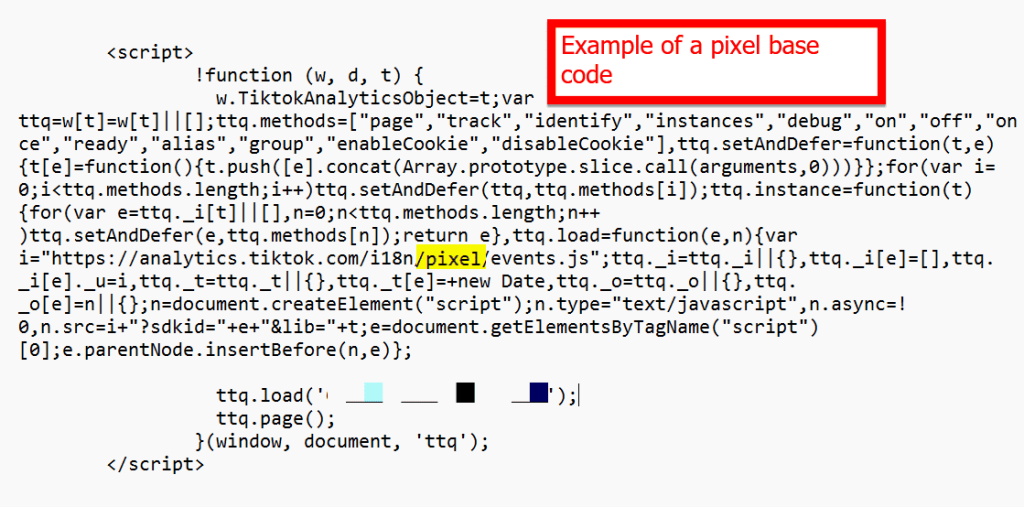
This code needs to be installed on your website for tracking purposes.
Setting up conversion events is crucial and should align with your business objectives. Customizing these events ensures that you track and measure specific actions that are valuable to your business growth.
Installing on Shopify
For Shopify users, installing the TikTok Conversion Pixel can be simplified by using the TikTok Pixel Helper app available in the Shopify App Store. After installation, input your pixel ID into the app settings to link it with your Shopify store seamlessly.
To confirm if the installation was successful, utilize the TikTok Pixel Helper tool, which verifies if the pixel is correctly implemented on your Shopify site.
Incorporating into Wix and Google Tag Manager
In Wix, navigate to Tracking & Analytics section where you can add custom code for implementing the TikTok Conversion Pixel effectively. This allows you to track user interactions and optimize your advertising strategies based on TikTok ads conversion tracking and TikTok conversion tracking pixel data.
Google Tag Manager streamlines pixel management by centralizing all tracking pixels in one location. By creating a new tag in Google Tag Manager and inserting the TikTok Conversion Pixel code, you simplify pixel management across various platforms effortlessly.
TikTok Pixel Events
Exploring Events
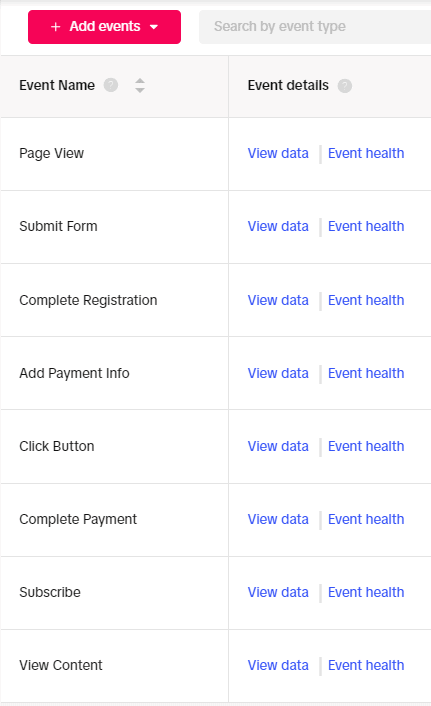
The TikTok Conversion Pixel is a powerful tool for tracking essential events on your website. These events can range from purchases to registrations, providing valuable insights into user behaviour. By customizing event parameters, you can delve deeper into specific actions users take on your site. Understanding these events is crucial as it allows you to tailor your marketing strategies effectively.
Events like add-to-carts or video views offer unique perspectives on how users interact with your platform. For instance, if you notice a high number of add-to-carts but low conversions, you may need to optimize the checkout process. Similarly, monitoring video views can help gauge user interest and refine your content strategy accordingly.
- Pros:
- Provides detailed insights into user actions
- Enables customization for specific event tracking
- Cons:
- Requires regular monitoring and optimization
- May need technical expertise for advanced customization
Tracking Specific Events on Shopify
If you’re using Shopify as your e-commerce platform, integrating TikTok Pixel for event tracking is seamless. Within the Shopify admin panel, navigate to the TikTok Pixel app settings to enable event tracking effortlessly. Once enabled, select the specific events you want to monitor closely—whether it’s purchases, sign-ups, or other crucial interactions.
After configuring the desired events within the app settings, it’s vital to test their functionality in real-time. Perform actions like making a purchase or signing up on your website while keeping an eye on the pixel dashboard. This step ensures that each event registers accurately within the pixel system so that you can rely on precise data for optimizing future campaigns.
- Go to Shopify admin and access TikTok Pixel app settings.
- Enable event tracking and select desired events (e.g., purchases).
- Test by performing selected actions on your site and check pixel dashboard for updates.
Optimizing Ad Campaigns
Using TikTok Pixel for Conversions
The TikTok Conversion Pixel is a powerful tool that offers essential insights into your ad campaigns. It provides data on conversion rates, cost per conversion, and revenue generated. By analysing this information, you can pinpoint which ads are performing well and adjust your budget accordingly. For example, if you notice that a particular ad has a high conversion rate but low revenue generation, you may need to tweak the targeting or creative elements.
Moreover, utilizing the pixel insights allows you to enhance your landing pages for better conversion rates. Suppose the data shows that users are dropping off at a specific point in the funnel. In that case, you can optimize that stage to improve overall conversions. This iterative process of analysing data and making improvements based on it is crucial for maximizing the effectiveness of your advertising campaigns.
- The TikTok Conversion Pixel provides crucial data on conversion rates and cost per conversion.
- Analyse this data to identify top-performing ads and allocate your budget effectively.
- Use pixel insights to optimize landing pages and boost overall conversion rates.
Optimizing with Shopify’s Pixel
When combining the TikTok Conversion Pixel with Shopify’s native Facebook pixel, advertisers gain comprehensive tracking capabilities across platforms. Leveraging both pixels’ data offers deeper insights into audience behaviour across different platforms like TikTok and Facebook. For instance, by correlating user actions tracked by both pixels, businesses can understand how customers interact with their brand from discovery through purchase.
This combined dataset not only enhances targeting strategies but also helps maximize conversions by refining ad delivery based on cross-platform performance metrics gathered from both pixels.
- Combine TikTok Conversion Pixel with Shopify’s Facebook pixel for holistic tracking.
- Leverage combined pixel data for profound audience behaviour understanding across diverse platforms.
- Refine targeting strategies using cross-platform performance metrics derived from both pixels.
TikTok Pixel Helper
Importance

A TikTok conversion pixel is crucial for tracking user actions and optimizing ad campaigns effectively. It helps in measuring the success of your ads by providing insights into how users interact with your website after viewing your TikTok ads. By understanding these interactions, you can refine your targeting strategies and improve ad performance.
Installing the TikTok pixel code correctly on all relevant pages of your website ensures accurate tracking of user behaviour. This allows you to monitor conversions, optimize ad delivery, and create targeted audiences based on specific actions taken by users on your site. Utilizing the TikTok Pixel Helper tool can help troubleshoot any visibility issues that may arise with the pixel installation.
Troubleshooting Visibility
- Check if the TikTok pixel code is properly installed on every page where you want to track user actions.
- Ensure that the pixel code is placed in the header section of each webpage to capture data accurately.
- Use the TikTok Pixel Helper tool to test whether the pixel is firing correctly and capturing events such as page views, add-to-carts, or purchases.
- Inadequate placement or incorrect installation of the TikTok conversion pixel can lead to inaccurate tracking results.
- Regularly monitoring and testing the pixel using tools like TikTok Pixel Helper are essential for maintaining optimal performance.
Security and Privacy
Ensuring Security
The TikTok Conversion Pixel prioritizes security and privacy, following stringent standards. It operates by gathering anonymous data to safeguard user privacy. Users can rely on the pixel for secure operations that protect their information effectively.
To maintain compliance with cookie consent regulations, consider incorporating a cookie banner or pop-up on your website. This ensures users are informed about the utilization of cookies, including the TikTok Conversion Pixel. Providing an option for users to opt out if they wish is essential in respecting their preferences regarding data collection.
Collecting Cookie Consent
Implementing a proper cookie consent solution is crucial to adhere to regulations and respect user choices. By configuring your setup correctly, you ensure that user preferences concerning cookies, such as the TikTok Conversion Pixel, are duly acknowledged and honored. Make sure your website’s settings include clear information about cookies usage and offer users an easy way to manage their preferences wisely.
Advanced Strategies
Paid Media Integrations
The TikTok Conversion Pixel seamlessly integrates with platforms like Google Ads or Facebook Ads Manager. By doing so, you can accurately track cross-platform conversions and attribute them correctly. This integration provides a comprehensive view of your marketing efforts by combining data from various advertising platforms.
Integrating the TikTok Conversion Pixel with different paid media platforms is a powerful tool to enhance your advertising strategy. For example, if you run ads on both TikTok and Facebook, using the pixel allows you to measure conversions across both channels accurately. This practice of leveraging multiple ad platforms helps in optimizing your overall marketing performance.
Conversion APIs
Utilize TikTok’s Conversion API to transmit offline conversion data directly from your CRM or point-of-sale system. This API enables tracking of conversions occurring beyond your website, offering a more holistic view of how well your campaigns are performing. Implementing the Conversion API ensures precise tracking and optimization of your TikTok advertisements.
Leveraging the Conversion API is one of the best practices. For instance, suppose you have an e-commerce store where most purchases happen offline; using this feature will help attribute these sales back to your TikTok ads effectively.
Managing TikTok Pixel
Adding, Editing, Sharing
Adding and editing events in the TikTok Conversion Pixel dashboard is simple. You can easily track various actions on your website by adding specific event codes to the pixel. For instance, if you want to track purchases or sign-ups, you can add these events within the dashboard.
Sharing access to the pixel with team members or agencies allows for collaborative campaign management. It ensures that everyone involved in marketing efforts has real-time data visibility and can optimize strategies accordingly. By managing permissions effectively, you control who can make changes or view pixel data.
Uninstalling Pixel
If you decide not to use the TikTok Conversion Pixel anymore, removing it from your website is essential. Simply delete the pixel code from your site to stop tracking user interactions accurately. In platforms like Shopify, uninstalling the TikTok Pixel Helper app and deleting associated settings are crucial steps.
Updating your privacy policy is necessary when discontinuing pixel tracking as users should be informed about this change. Make sure users understand how their data will be handled moving forward without any form of tracking.
Measuring Success
Social Marketing Improvement
The TikTok Conversion Pixel plays a crucial role in enhancing your social marketing strategies. By delving into the conversion data provided by the pixel, you can uncover valuable insights that can steer your campaigns towards success. For instance, you can pinpoint emerging trends within your target audience and craft ad content that resonates with them effectively. This allows you to refine your advertising approach continuously based on real-time data, ensuring that you are always aligned with what works best for your audience.
Monitoring and adjusting campaigns based on pixel data is key to maintaining relevance and engagement with your TikTok ads. Imagine being able to track how different demographics respond to specific ad formats or messages through this pixel tool. It enables you to tweak elements of your campaign such as timing, visuals, or messaging promptly for optimal results. With this level of precision in analysing user behaviour patterns, you have the power to adapt swiftly and stay ahead in the dynamic landscape of social media marketing.
Advantages of Tracking Pixel
The advantages offered by the TikTok Conversion Pixel are multifaceted and impactful. One significant benefit is its ability to provide accurate tracking of conversions resulting from your ads – a fundamental metric in determining campaign effectiveness. Gaining insights into audience behaviours allows for more targeted approaches tailored specifically towards high-value consumers who are more likely to convert.
Utilizing the conversion pixel empowers marketers with actionable information that leads to informed decision-making processes regarding their TikTok campaigns’ optimization strategies. By understanding which aspects of an ad resonate most with viewers or drive desired actions like purchases or sign-ups, advertisers can fine-tune their content creation process effectively using these insights gleaned from pixel data analysis.
Closing Thoughts
You’ve now got the lowdown on TikTok Pixel, from setting it up to fine-tuning your ad strategies. Remember, success here isn’t just about the numbers; it’s about understanding your audience and crafting campaigns that resonate with them. So, dive in, experiment, and keep an eye on those metrics.
Now that you’re armed with this knowledge, go ahead and unleash your creativity on TikTok. The platform is your playground, and TikTok Pixel is your secret weapon. So, get out there, test different approaches, and watch as your campaigns soar to new heights!
Frequently Asked Questions
What is the TikTok Pixel and why is it important?
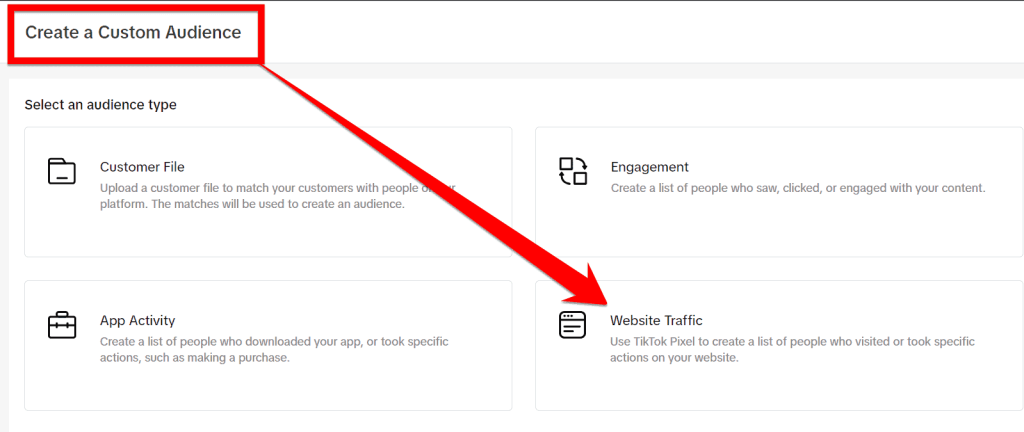
The TikTok Pixel is a tool that helps track conversions from your ads, optimize ad delivery, and build targeted audiences for future campaigns. It’s crucial as it provides valuable insights to improve your advertising strategy and boost ROI.
How can I set up the TikTok Pixel on my website?
To set up the TikTok Pixel, you need to create an account in TikTok Ads Manager, generate the pixel code, place it between the tags of your website’s HTML code, and verify its installation using the TikTok Pixel Helper Chrome extension.
What are some key events that can be tracked using the TikTok Pixel?
With the TikTok Pixel, you can track various events such as page views, add-to-cart actions, purchases completed, sign-ups or registrations on your website. Tracking these events allows you to measure user interactions accurately and optimize your ad campaigns accordingly.
How does optimizing ad campaigns with the help of TikTok Pixel benefit businesses?
Optimizing ad campaigns with TikTok Pixel enables businesses to target their ads more effectively based on user behaviour data. By analysing which actions users take after viewing an ad (conversions), businesses can refine their targeting strategies and allocate budget wisely for better results.
Is privacy a concern when using the TikTok Pixel for tracking user activity?
TikTok takes privacy seriously by providing options for users to manage their data preferences. As advertisers use aggregated data from pixel tracking rather than individual information, privacy risks are minimized. However always ensure compliance with relevant regulations like GDPR for user transparency.
What are the limitations of the TikTok pixel after iOS 14?
With the introduction of iOS 14 and later updates, there have been significant changes in how TikTok Pixel operates and tracks user activity. These updates have placed a greater emphasis on user privacy and transparency, requiring apps like TikTok to request explicit permission from users to track their activity across other apps and websites. This means that TikTok Pixel may face challenges in tracking user behaviour accurately, as some users may choose to opt-out of tracking due to privacy concerns. As a result, advertisers and businesses utilizing TikTok Pixel may experience limitations in targeting and measuring the effectiveness of their campaigns. Overall, the impact of iOS 14 and later updates on TikTok Pixel underscores the growing importance of privacy considerations in digital marketing strategies.
How can marketers who rely on TikTok pixel work around the constraints of iOS 14 and beyond?
Advertisers who rely on TikTok pixel data can explore alternative solutions to work around the limitations imposed by iOS 14 and later updates. One approach is to focus on first-party data collection by encouraging users to opt-in to tracking through personalized messages or incentives. This way, advertisers can directly gather data from engaged users who are willing to share their information. Additionally, utilizing contextual targeting based on user behaviour within the app can help advertisers reach their target audience effectively without relying heavily on third-party data. Collaborating with TikTok to leverage their machine learning algorithms and data insights can also provide valuable audience targeting options while staying compliant with privacy regulations. Overall, adapting strategies to prioritize user consent, contextual targeting, and platform-specific tools can help advertisers navigate the challenges posed by iOS 14 and beyond.
Key Takeaways
- Implementing a TikTok pixel on your website can help track conversions and optimize ad campaigns effectively.
- Utilize TikTok Pixel Events to track specific actions on your site, such as purchases or sign-ups, and tailor your ads accordingly.
- Regularly optimize your ad campaigns based on TikTok Pixel data to improve performance and reach your target audience more effectively.
- Use the TikTok Pixel Helper browser extension to troubleshoot and ensure your pixel is functioning correctly for accurate tracking.
- Prioritize security and privacy by following best practices when setting up and managing your TikTok Pixel to protect user data.
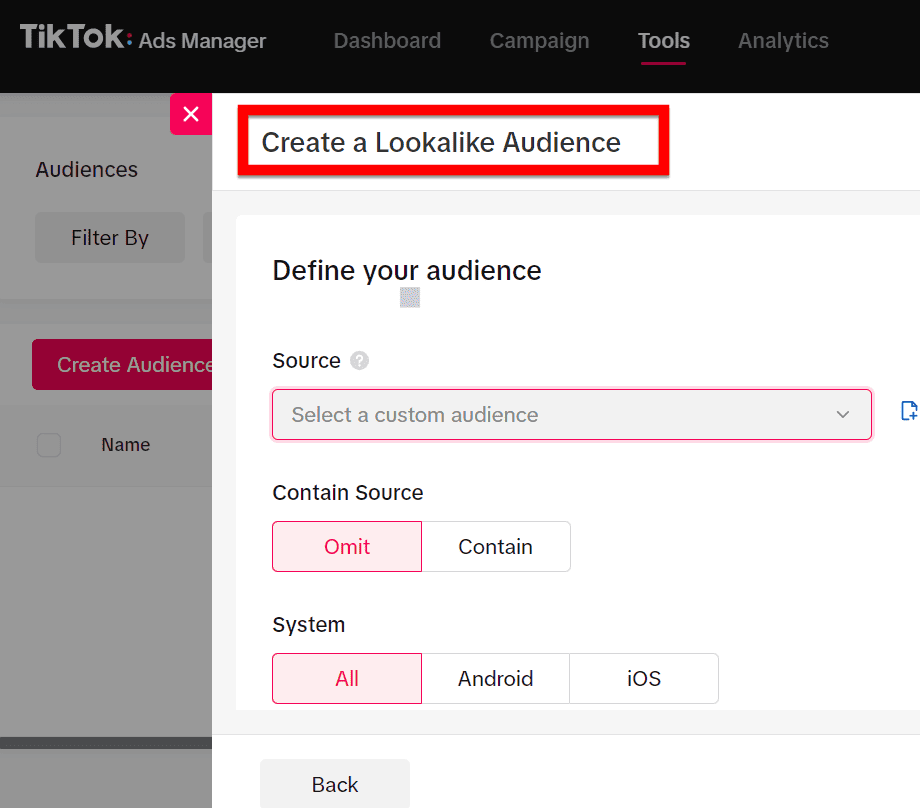
- Explore advanced strategies like custom conversions and lookalike audiences to maximize the impact of your TikTok Pixel and drive better results.
- Consistently monitor and manage your TikTok Pixel to make necessary adjustments and improvements for better tracking and ad performance.
- Measure the success of your campaigns by analysing TikTok Pixel data to understand user behaviour and make informed decisions for future marketing efforts.